
ENCRYPTION, EXPLAINED
Encrypted on your device.Verified on your device.
Your device encrypts file contents and sensitive metadata before upload. It verifies and decrypts them when you open a file. This page explains file encryption, key management and our Tink-compatible streaming format.
Explore the public cryptography- Files & key envelopes
- AES-256-GCM
- Passphrase derivation
- Argon2id
- Streaming format
- Tink-compatible
From your device to storage
Open full-size diagram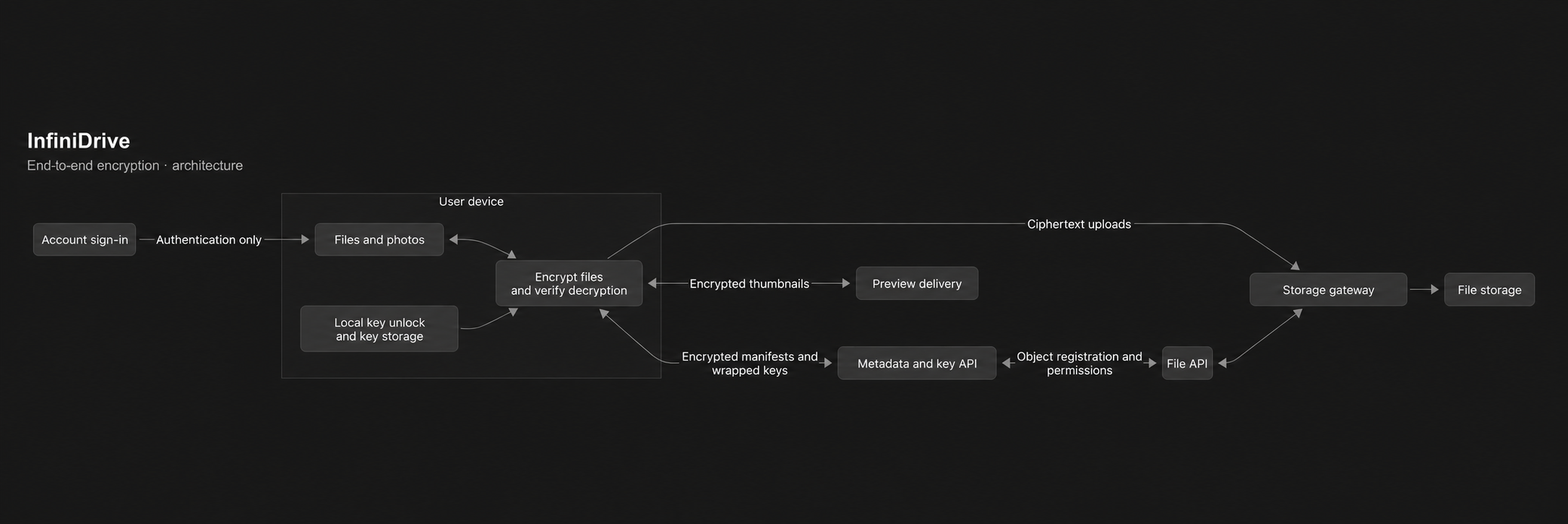
01
Sign-in and decryption are separate
Signing in lets the service identify your account and enforce access permissions. Unlocking an encrypted drive happens locally, using an encryption passphrase, a recovery key or a supported encryption passkey. The account login alone does not supply the secret needed to decrypt the drive.
02
How your keys are created and unlocked
Account setup generates a random 256-bit root key and an ECDSA P-256 signing key pair on the device. The root key and private signing key are kept in an encrypted account bundle. The server receives encrypted copies of that bundle and the public verification key.
The encryption passphrase is normalized with Unicode NFKC and processed by Argon2id with a random 16-byte salt, 64 MiB of memory, 3 iterations and parallelism 4. The resulting 256-bit key protects the account bundle with AES-GCM. These parameters slow password guessing; a strong, unique passphrase still matters.
A separately generated random 256-bit recovery key protects another copy of the same bundle. Changing the passphrase rewraps the bundle; it does not re-encrypt every stored file. On supported authenticators, WebAuthn PRF supplies material for a separate passkey unlock envelope. A passkey used only for account sign-in is not automatically an encryption passkey.
Rewrapping does not revoke an old key bundle that someone has already copied and can unlock. Removing an encryption passkey stops future retrieval of its wrapper, but cannot erase keys already obtained by an unlocked client.
Keep the recovery key somewhere safe outside the drive. Losing every usable unlock method and every unlocked device can make the encrypted data unrecoverable. Resetting an account login does not recreate the encryption keys.
03
File encryption and the role of Google Tink
Each new file revision gets a fresh random 256-bit content key. Files are encrypted in authenticated segments, so clients can upload large files and read a requested range without first decrypting the entire file. Each segment is checked before its plaintext is released.
InfiniDrive implements the wire format compatible with Google Tink’s RAW AES256_GCM_HKDF_1MB Streaming AEAD profile. HKDF-SHA-256 derives a per-stream AES key from the content key and a fresh salt. Segment nonces combine a random prefix, the segment index and a final-segment flag. The format authenticates segment position and completion.
Compatibility with Google Tink is verified through bidirectional encryption and decryption tests.
| Component | Implementation |
|---|---|
| Wire-format identifier | infinidrive-tink-aes256-v1 |
| File stream | AES-256-GCM + HKDF-SHA-256; RAW AES256_GCM_HKDF_1MB-compatible |
| Ciphertext segment size | 1,048,576 bytes (1 MiB); includes a 16-byte authentication tag |
| Stream header | 40 bytes: header length, 32-byte salt, 7-byte nonce prefix |
| Key and metadata envelopes | AES-256-GCM; random 12-byte nonce; 128-bit authentication tag |
| Passphrase KDF | Argon2id: 65,536 KiB memory, 3 iterations, parallelism 4, 16-byte salt |
| Key separation | HKDF-SHA-256 with purpose-specific context |
| Signatures | ECDSA P-256 with SHA-256 |
04
Metadata, signatures and version checks
File names and content metadata are encrypted separately from file bytes. Content keys are wrapped in authenticated encryption envelopes. Context binds protected data to its account, node, revision and purpose, reducing the risk of accepting a valid encrypted object in the wrong place.
ECDSA P-256 signatures with SHA-256 protect manifests and account operations. Clients check signatures, object identities and revision context before exposing content. History checks compare server responses with locally remembered checkpoints to detect rollback or conflicting history relative to what that device has already observed.
A new device needs an initial trusted state. Local checkpoints are not a global key-transparency service, and signatures alone cannot guarantee that a server presents the same history to every device.
05
Photos, previews and shared links
Supported clients generate image and video previews locally. A preview has its own random revision key and is encrypted before upload. Its encrypted, signed metadata binds it to the source file revision. Preview delivery stores and serves encrypted bytes; the client verifies and decrypts the image.
An encrypted public link carries its decryption secret in the URL fragment, after the # character. Browsers do not include that fragment in the HTTP request to the server. The recipient’s browser uses the secret locally to unlock the shared content.
The link also contains a separate access capability, which the client sends to the service to authorize retrieval, and a digest that pins the signed share record. The encrypted grant contains keys for the selected file revisions, rather than the account root key. A shared link refers to a read-only snapshot of those revisions.
Anyone with the complete link can use its secret, so treat the link like access to the file. Revoking a link can stop future service access, but cannot erase a copy that a recipient has already downloaded or decrypted.
06
Where keys and readable files live
Native clients can remember unlocked account keys using operating-system protection: Keychain on Apple platforms, secure storage backed by Android Keystore, and per-user DPAPI on Windows. The app needs usable keys while it is decrypting; operating-system storage does not make a compromised, unlocked device safe.
Locking the drive and signing out restrict further use of its keys. Readable files already downloaded through Finder, Explorer, an export or another app can remain on disk. Local files, operating-system thumbnail caches, backups and other apps have their own protection and retention rules.
Inspect the public cryptography
Download the cryptographic source, with synthetic test cases and a Google Tink interoperability harness.
The archive includes file streaming, key envelopes, signatures, node and share formats, preview metadata and passkey envelope helpers, plus pinned dependencies and instructions for running the tests. The production cryptographic modules are copied without changes; the package entry points are narrowed for this release.
522accd052f0f23b0239973ff8be604d2a7eef11c1fd411852ed9609bab1b9edThis is a cryptographic source snapshot, not the complete client or server. It excludes application interfaces, deployment configuration, service transport, device key storage and the full history-checking integration. The separate Dart and Swift implementations are outside this download. License: AGPL-3.0-only; dependency notices are included.